xvg
面向 Flutter 的高性能静态与动画 SVG 渲染。Rust(usvg)负责解析,Flutter 自己的 GPU 管线负责绘制,没有 CPU 光栅化;SMIL 动画由 Dart 侧原创引擎驱动。
High-performance static & animated SVG rendering for Flutter. Rust (usvg) parses, Flutter's own GPU pipeline renders — no CPU rasterizer. SMIL animation runs on an original Dart-side engine.


功能导览Feature tour
以包内 README 与 doc/ 为准。Based on the package README and doc/.
静态 SVG(Rust usvg)Static SVG (Rust usvg)
usvg 解析为缓存的 ui.Picture,再交给 Flutter GPU 管线绘制。支持基础形状、<use>、<switch>、<marker>、组 opacity、内嵌 data: 位图。
usvg parses into a cached ui.Picture, drawn by Flutter's GPU pipeline. Shapes, <use>, <switch>, <marker>, group opacity and embedded data: images.
渐变 / clip / mask / filterGradients / clip / mask / filter
线性与径向渐变、clipPath、mask、pattern;filter 目前只有 feGaussianBlur。
Linear & radial gradients, clipPath, mask, pattern; the only filter primitive is feGaussianBlur.
currentColor
源里的 currentColor 通过 XvgTheme(currentColor: ...) 控制,静态与动画路径都生效;colorFilter 可整体重着色。
currentColor in the source is controlled via XvgTheme(currentColor: ...) on both paths; colorFilter recolors the whole image.
SMIL 动画(原创引擎)SMIL animation (original engine)
<animate>、<animateTransform>、<animateMotion>、<set>;一次解析,Dart 侧逐帧采样绘制,每帧无数据跨 FFI。另支持 SVGator 导出的 CSS @keyframes 子集。
<animate>, <animateTransform>, <animateMotion>, <set>; parse once, sample and paint every frame in Dart — no per-frame FFI traffic. A subset of SVGator-exported CSS @keyframes is also supported.
播放控制Playback control
XvgAnimationController:play / pause / stop / reverse / seek、倍速、区间(once / loop / pingPong)、fitDuration;也可由 Flutter Animation<double> 驱动;XvgAnimationQuality 在高并发下自适应跳帧。
XvgAnimationController: play / pause / stop / reverse / seek, rates, ranges (once / loop / pingPong), fitDuration; or drive with a Flutter Animation<double>; XvgAnimationQuality adaptively skips frames under high concurrency.
一个 Widget,五种来源One widget, five sources
Xvg.string / asset / network / file / memory,自动判断走静态还是动画路径;另有 StaticXvg / AnimatedXvg,以及可替换 Image.network 的 NetworkXvg 等 ImageProvider。
Xvg.string / asset / network / file / memory auto-select the static or animated path; plus StaticXvg / AnimatedXvg and ImageProviders such as NetworkXvg as an Image.network replacement.
预编译原生库Prebuilt native libraries
包内带预编译库(见 prebuilt/),使用方无需 Rust 工具链;pubspec 声明了 Android、iOS、Linux、macOS、Windows 五个 FFI 平台。Android/iOS 等的行为尚未全面实测,见限制。
Prebuilt libraries ship in the package (see prebuilt/) — no Rust toolchain needed for consumers; the pubspec declares five FFI platforms. Android/iOS etc. are not exhaustively tested; see limits.
安全边界Safety limits
静态路径有输入大小(32 MiB)、嵌套(128 层)、引用链、展开预算等限制,超限返回错误;<image href> 只解析内嵌 data: URI。
The static path enforces input size (32 MiB), nesting (128), reference-chain and expansion budgets, returning an error when exceeded; <image href> only decodes embedded data: URIs.
已知限制(如实)Known limits (honest)
- 静态路径不渲染
<text>(为缩小体积的刻意取舍);动画路径的<text>不受影响。The static path does not render<text>(a deliberate size trade-off); animated-path<text>is unaffected. - filter 仅
feGaussianBlur;mask/blur 不嵌套叠加。OnlyfeGaussianBluris implemented; mask/blur do not nest. - 事件类 SMIL
begin(如 click)不支持;不支持 gzip SVG(svgz)。Event-based SMILbegin(e.g. click) and gzip SVG (svgz) are unsupported. parse_svg同步阻塞调用线程,不可信输入请放后台 isolate。parse_svgis synchronous; parse untrusted input on a background isolate.
实时 SVG 预览Live SVG preview
这些 SVG 取自 / 改写自 example 应用的演示用例,由浏览器原生渲染(含 SMIL 动画),用于展示 xvg 面向的内容类型。xvg 中的实际效果以 example 应用为准;为适配深浅色背景,个别描边色做了调整。 These SVGs come from (or are adapted from) the example app's demo cases and are rendered natively by the browser (including SMIL). They show the kind of content xvg targets; actual xvg output is what the example app shows. A few stroke colors were adjusted for light/dark backgrounds.
静态Static

static-check.svglinear-gradient.svg
radial-gradient.svg
clip-path.svg
mask-static.svg
blur-filter.svg
pattern.svg
named-colors.svg
group-transform.svg
paint-order.svgSMIL 动画SMIL animation
confirm-circle.svgspinner.svg
rotation-marker.svg
skewx.svg
use-animated.svg
syncbase-relay.svganimate-motion.svg
motion-keypoints.svganimated-mask.svganimated-gradient.svgcurrentColor
同一份 SVG 源,改变外层颜色即换色;xvg 里对应 XvgTheme(currentColor: Colors.purple)。One SVG source, recolored by changing the surrounding color; in xvg this maps to XvgTheme(currentColor: Colors.purple).
性能数据Performance
以下数字全部摘自仓库 xvg/doc/performance-benchmarks.md 的实测记录,未做改动;设备与口径随表注明。
All numbers are quoted unchanged from the measured records in xvg/doc/performance-benchmarks.md; device and methodology are noted per table.
静态:1000 个真实 Mdi 图标,xvg vs flutter_svgStatic: 1000 real Mdi icons, xvg vs flutter_svg
来源:「单编译顺序对比模式 LIB=compare」首次实测。设备:Windows 桌面,profile 模式;同一进程、同一时段配对;8 列 GridView 来回滚动 6 轮。
Source: first LIB=compare run. Device: Windows desktop, profile mode; same process, paired; 8-column GridView scrolled back and forth 6 rounds.
| 指标Metric | xvg | flutter_svg |
|---|---|---|
| build avg / p50 / p90 / p99 / max (ms) | 0.776 / 0.668 / 1.274 / 2.577 / 3.267 | 1.823 / 1.731 / 3.185 / 5.994 / 8.406 |
| raster avg / p50 / p90 / p99 (ms) | 1.769 / 1.660 / 2.354 / 3.398 | 2.134 / 2.029 / 2.934 / 3.769 |
| raster max (ms) | 4.484 | 4.160 |
| 掉帧 >8.3ms / >16.6msFrames >8.3ms / >16.6ms | 0 / 0 (646 帧frames) | 1 / 0 (542 帧frames) |
| 内存峰值 / 稳态 / 空闲后 (MB)Memory peak / steady / idle (MB) | 236.76 / 235.57 / 236.21 | 292.25 / 264.31 / 265.55 |
| xvg 解析耗时xvg parse time | avg 0.039 / p99 0.189 ms | 无公开钩子,未测no public hook, not measured |
raster max 一项 xvg 落后(4.484 vs 4.160 ms),是单样本极值,文档如实记录。该设备测量噪声大,文档指出 ±20~30% 的绝对值波动不足以单独作为回归证据;相对比值比绝对值更可靠。 xvg trails on raster max (4.484 vs 4.160 ms) — a single-sample extreme, recorded honestly in the doc. The source notes ±20–30% absolute noise on this dev machine; ratios are more reliable than absolute values.
动画:SMIL 与 CSSAnimation: SMIL & CSS
| 场景Scenario | 设备Device | 结果Result |
|---|---|---|
| 12 个并发 SMIL 图标,观测 6 秒12 concurrent SMIL icons, 6 s | Windows 桌面 profiledesktop, profile | 361 帧frames, build avg 0.408 ms, raster avg 1.831 ms, >16.6ms: 0 |
| 1000 格动画图标滚动(399 个互异图标平铺;旧数据源)1000-cell animated grid scroll (399 distinct icons tiled; older data source) | Windows 桌面 profiledesktop, profile | real_fps 59.95, >16.6ms: 0 |
| 同上,Iconify 官方数据,4 次中位数Same, official Iconify data, median of 4 runs | Huawei STG-AL00 (Adreno 610), profile | real_fps 49.3, build avg 10.46 ms, raster avg 17.36 ms |
| 少量图标稳态(1/4/16 个循环图标)Few-icon steady state (1/4/16 looping icons) | Huawei STG-AL00 | 稳定在 59.8–59.95 fps;16 个带 mask 图标 raster 约 10.9 msstable at 59.8–59.95 fps; 16 masked icons raster ~10.9 ms |
| SVGator CSS 插画全屏(55 个样本,3 次)SVGator CSS illustrations fullscreen (55 samples, 3 runs) | Huawei STG-AL00 | real_fps 中位数median 59.85, p10 ≥ 59.73 |
来源:同一文档「性能复测」「2026-11-05:动画基准换用 Iconify 官方数据后的真机新基线」等节。两个数据源的数字不能直接比较。 Source: the “re-measurement” and “2026-11-05 real-device baseline” sections of the same doc. Numbers from the two data sources are not directly comparable.
静态:手机上 1000 图标滚动Static: 1000-icon scroll on a phone
设备:Huawei STG-AL00(Adreno 610,Impeller GLES),profile,3 次。该节未与 flutter_svg 对照,文档注明新版 flutter_svg 在安卓上的对比尚待重测。 Device: Huawei STG-AL00 (Adreno 610, Impeller GLES), profile, 3 runs. No flutter_svg comparison in that section; the doc notes the comparison against current flutter_svg on Android is still to be re-measured.
| 指标Metric | xvg |
|---|---|
| build avg | 5.05 ms (4.80–5.11) |
| raster avg | 10.20 ms (10.14–10.22) |
| 超过 16.6ms 的帧Frames over 16.6 ms | 1–2 |
| parse avg (n=1000) | 0.19 ms |
example 应用截图Example app screenshot
Windows 桌面上的 example 验收页:SMIL 动画、旋转加载环、静态 usvg 路径、currentColor 主题覆盖(紫色)、paint-order 对比。窗口标题里的 fsvg 是项目改名前的旧名。
The example acceptance page on Windows desktop: SMIL animation, spinner, static usvg path, currentColor theme override (purple), paint-order comparison. The fsvg in the window title is the project's old name, before the rename.
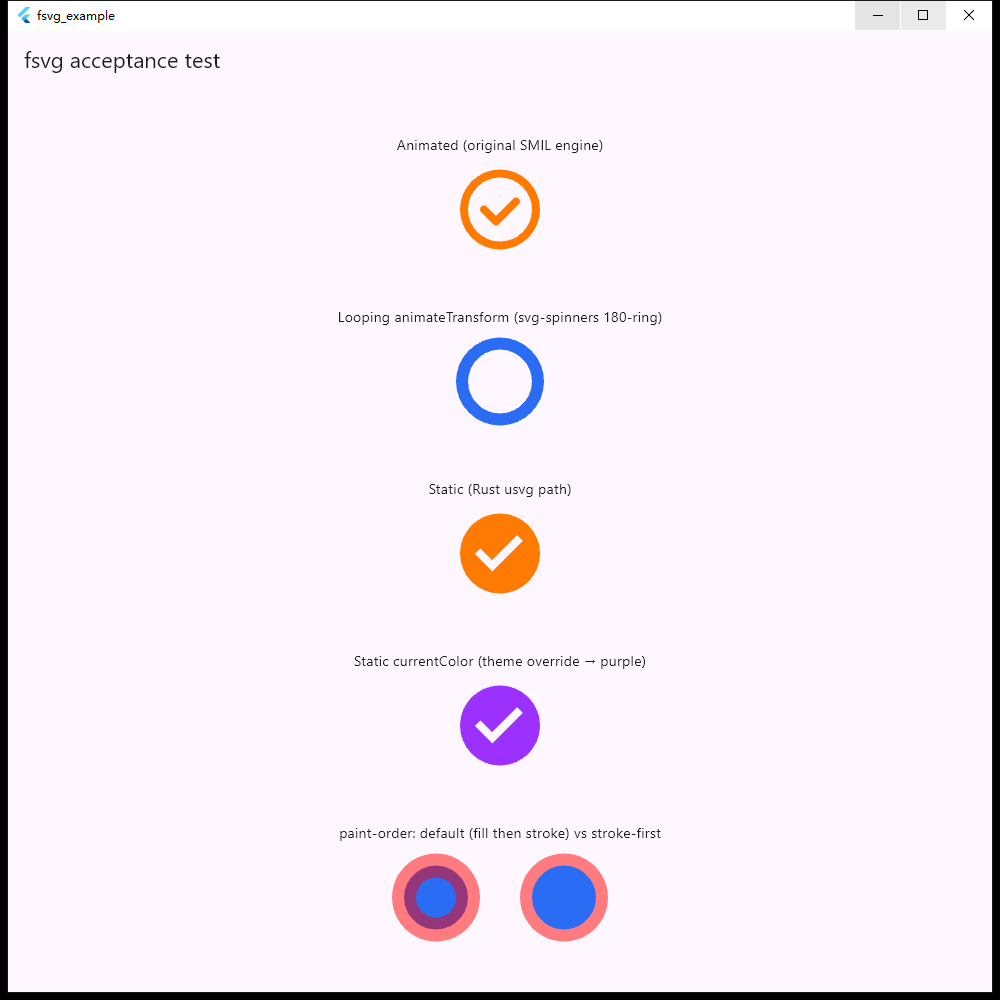
example 还包含「动画控制」页:播放、seek、倍速、区间、时长适配、事件日志与曲线驱动。The example also has an “Animation control” page: playback, seek, rates, ranges, duration fitting, an event log and a curved driver.
安装与用法Install & usage
flutter pub add xvgimport 'package:flutter/widgets.dart';
import 'package:xvg/xvg.dart';
Future<void> main() async {
WidgetsFlutterBinding.ensureInitialized();
await Xvg.ensureInitialized();
runApp(const MyApp());
}
// 字符串 / String
Xvg.string(svgSource, width: 48, height: 48)
// 资源 / Asset
Xvg.asset('assets/icon.svg', width: 96, height: 96)
// 重着色 / Recolor
Xvg.string(svgSource, colorFilter: ColorFilter.mode(Colors.blue, BlendMode.srcIn))
// currentColor
Xvg.string(svgSource, theme: XvgTheme(currentColor: Colors.blue))// 动画控制 / Animation control
final controller = XvgAnimationController(autoplay: false);
Xvg.string(svgSource, controller: controller, onLoaded: (info) {
controller.play();
});
// 由 Flutter Animation 驱动 / Drive with a Flutter Animation<double>
Xvg.string(svgSource, animation: myAnimationController,
animationSpan: const Duration(seconds: 2))
// 替换 Image.network / Replace Image.network
Image(image: NetworkXvg(url))完整 API 与限制见 pub.dev 与 GitHub README。See pub.dev and the GitHub README for the full API and limits.